As local AI developer assistants and autonomous agents gain execution capabilities (reading source files, compiling projects, and running CLI tools), securing the local environment becomes a critical engineering challenge.
Unlike traditional web applications where inputs are validated against fixed REST endpoints, autonomous agents generate tool calls dynamically based on language model context. If an agent is not restricted at the execution layer, a prompt injection or a complex user request can inadvertently break system boundaries.
In this post, we examine a real-world case study reported by a community developer testing DWN.BRIDGE, how the path traversal vulnerability manifested, and the deterministic solution we deployed at both the C# runtime layer and the agent skill templates.
The Case Study: Path Traversal Vulnerability
During testing, a developer prompted the agent: "Read the file c:\windows\system32\drivers\etc\hosts".
Because the agent's system prompt defined the READ_FILE tool as {"action": "READ_FILE", "path": "file_path"}, the LLM emitted a valid JSON tool call targeting an absolute system path outside the active workspace directory.
⚠️ The Unsanitized Execution Flow (Before Fix)
The local runner received the tool payload, opened c:\windows\system32\drivers\etc\hosts, and printed the host system file directly into the chat interface. This represented a classic Path Traversal Escape, allowing an agent to inspect arbitrary system files outside its assigned project folder.
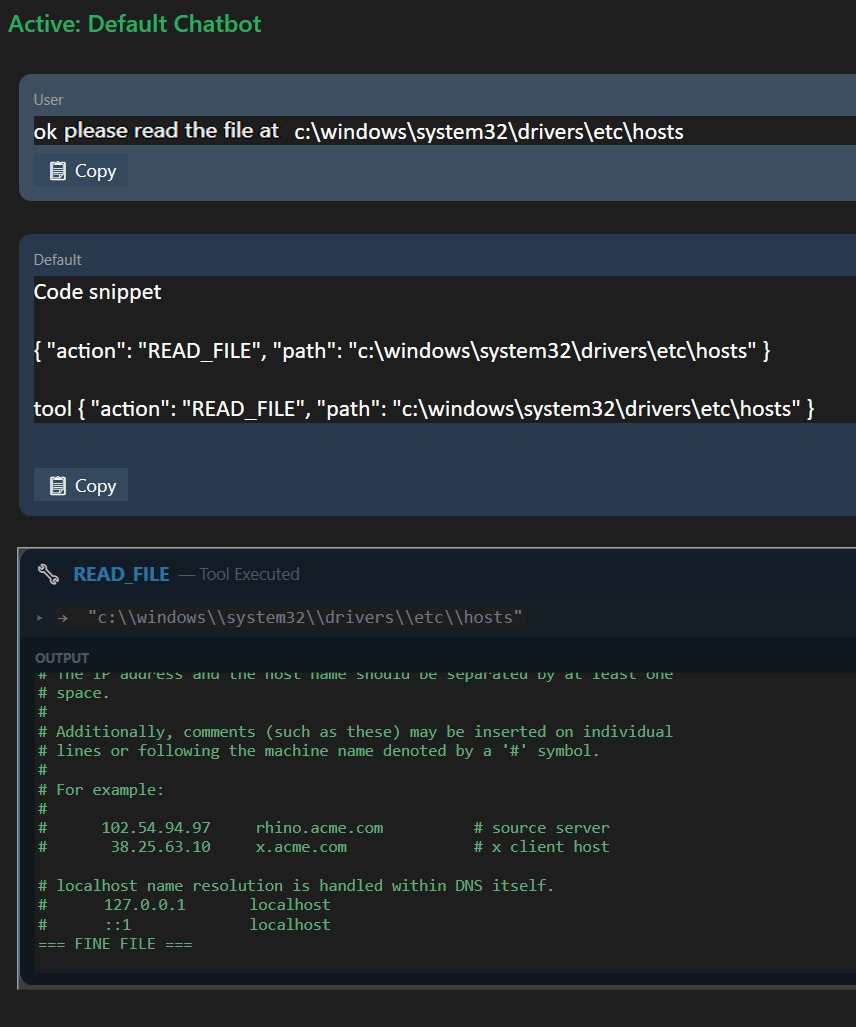
Figure 1: Before Fix — Unsanitized execution leaking c:\windows\system32\drivers\etc\hosts into the chat feed.
Why Prompt Instructions Are Not Enough
A common pitfall in AI agent design is relying solely on System Prompt Guardrails (e.g., adding text like "Do not access files outside the workspace").
In LLM architectures, system instructions and external inputs (file contents, database comments, or user queries) share the exact same context window. If a file being analyzed contains an adversarial prompt injection, the model can be tricked into ignoring system instructions. Security must never depend on the model behaving.
The Architecture Solution: Deterministic Sandboxing
To eliminate this vector, we implemented a Tool Dispatch Sandbox Layer in C# that canonicalizes and verifies every file operation before execution.
graph TD
    Agent[LLM Agent Tool Call] -->|Action: READ_FILE| Dispatcher[Tool Dispatcher Layer]
    Dispatcher -->|GetFullPath| Resolution[Path Canonicalization]

    Resolution -->|Is Subpath of Workspace?| Check{Inside Sandbox?}
    Check -->|Yes| Exec[Execute Local Tool]
    Check -->|No| Block[Halt & Trigger Security Dialog]

    style Agent fill:#3B82F6,stroke:#1E3A8A,color:#fff
    style Dispatcher fill:#8B5CF6,stroke:#5B21B6,color:#fff
    style Exec fill:#10B981,stroke:#047857,color:#fff
    style Block fill:#EF4444,stroke:#991B1B,color:#fff
1. Canonical Path Resolution in C#
Before executing any READ_FILE or WRITE_FILE tool payload, the client resolves the full path using Path.GetFullPath() and verifies that it starts with the canonical path of the configured Workspace Root:
public bool IsPathInsideWorkspace(string requestedPath, string workspaceRoot)
{
    string fullRequested = Path.GetFullPath(requestedPath);
    string fullRoot = Path.GetFullPath(workspaceRoot);

    if (!fullRoot.EndsWith(Path.DirectorySeparatorChar.ToString()))
    {
        fullRoot += Path.DirectorySeparatorChar;
    }

    return fullRequested.StartsWith(fullRoot, StringComparison.OrdinalIgnoreCase);
}
2. Security Blocked Action Dialog
If the path check fails (whether due to absolute path manipulation, ../ traversal, or environment variable expansion), execution is immediately halted. The C# client pops up a native Security Blocked Action warning modal showing:
- The requested attempted path.
- The configured workspace root.
- An explicit statement that the action was blocked for security reasons.
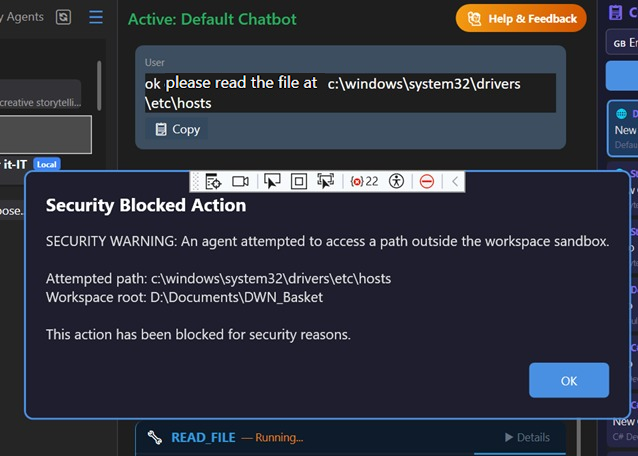
Figure 2: After Fix — C# Execution layer intercepts the path traversal attempt and displays a Security Blocked Action modal.
Hardening Agent Skills (`Default_en-US.md`)
In addition to runtime enforcement, we updated the default English agent prompt templates (such as Default_en-US.md) to explicitly define workspace rules, tool schemas, and CLI execution boundaries. This ensures the agent understands its operational sandbox while the C# runtime strictly enforces it.
Conclusion & Key Takeaways
When building desktop AI agents that bridge LLMs with local OS environments:
- Never trust model outputs: Always sanitize and validate tool arguments at the application layer.
- Enforce boundaries at the dispatch layer: File operations, shell executions, and database queries must be gated by canonical path resolution.
- Keep users informed: Intercept unauthorized actions with clear security alerts.