One of the most common questions developers ask when trying DWN.BRIDGE for the first time is: "Is it normal for the AI agent to repeatedly catch its own errors, rewrite the code, and try running it again without me touching anything?"
The short answer is: Yes, this is the defining characteristic of closed-loop autonomous agents.
When an AI assistant operates inside a traditional web chat, code execution is static: the LLM outputs a snippet, and if there is a syntax error or a missing dependency, the user has to copy-paste the error message back into the chat. In contrast, DWN.BRIDGE operates at the edge of autonomous agent capabilities by creating a closed feedback loop between the local C# execution engine and the LLM context window.
In this technical case study, we examine a real session submitted by a community member building a Python application, demonstrating how real-time CLI error interception enables zero-human-intervention self-healing loops.
The Real-World Session: From Geomancy to Python Execution
The user initiated the workspace session with a simple query:
DWN.BRIDGE automatically dispatched a LIST_DIR tool call, identifying a single text file: geomantica.txt. The user asked the agent to inspect the file and expand on its topic.
Geomancy is an ancient binary forecasting system based on modulo-2 arithmetic (XOR sums) generating 16 distinct 4-element figures (Mothers, Daughters, Nieces, Witnesses, and the Final Judge)..."
Recognizing the mathematical nature of the algorithm, the user prompted: "Great, now create a Python script to calculate a full Geomantic Shield."
The Failure: Syntax and Indentation Errors (Attempt #1)
The agent constructed the Python script geomanzia.py using the WRITE_FILE tool delimiter and immediately dispatched a RUN_COMMAND execution call:
{"action": "RUN_COMMAND", "command": "python geomanzia.py"}However, during multiline code generation, string escaping and indentation inconsistencies resulted in invalid Python syntax on line 26. The local C# execution engine ran the script via PowerShell and intercepted the process failure:
[Executed Command]: powershell.exe -Command cmd.exe /c python geomanzia.py
[Directory]: D:\Documents\DWN_Workspace
[Exit Code]: 1
[Output]: (no output produced)
[Error]:
File "geomanzia.py", line 27
    """Simulates generating a line of points..."""
IndentationError: expected an indented block after function definition on line 26
The Self-Healing Loop: Error Interception in Action
In a standard chatbot interface, execution would stop here. The user would have to manually read the stack trace, copy the IndentationError, and paste it back into the chat prompt.
Under DWN.BRIDGE's local execution architecture, the C# runner automatically captures the non-zero exit code (Exit Code: 1), collects the stderr buffer, and injects the raw error result directly back into the agent context loop.
graph TD
    User[User Prompt: Create Script] -->|WRITE_FILE & RUN_COMMAND| Runner[Local C# Execution Engine]
    Runner -->|Process Execution| CLI[CLI Terminal]

    CLI -->|Exit Code: 1 / Stderr| Intercept[C# Stderr & Exit Code Interceptor]
    Intercept -->|Inject Raw Error Payload| Context[LLM Context Window]

    Context -->|Self-Diagnosis| Agent[Agent Auto-Fix Logic]
    Agent -->|WRITE_FILE Fixed Script| Runner2[Re-Execute script.py]

    Runner2 -->|Exit Code: 0 / Stdout| Success[Render Result in Chat UI]

    style User fill:#3B82F6,stroke:#1E3A8A,color:#fff
    style Intercept fill:#EF4444,stroke:#991B1B,color:#fff
    style Agent fill:#8B5CF6,stroke:#5B21B6,color:#fff
    style Success fill:#10B981,stroke:#047857,color:#fff
Seeing the raw IndentationError in its feedback loop, the model self-diagnosed the issue without any user intervention:
The agent issued a second WRITE_FILE payload, cleanly overwriting geomanzia.py with proper Python indentation, and dispatched a second RUN_COMMAND python geomanzia.py.
The Result: Clean Execution (Exit Code 0)
The second execution returned Exit Code: 0 with full stdout output, rendering the complete generated Geomantic Shield directly inside the desktop interface.
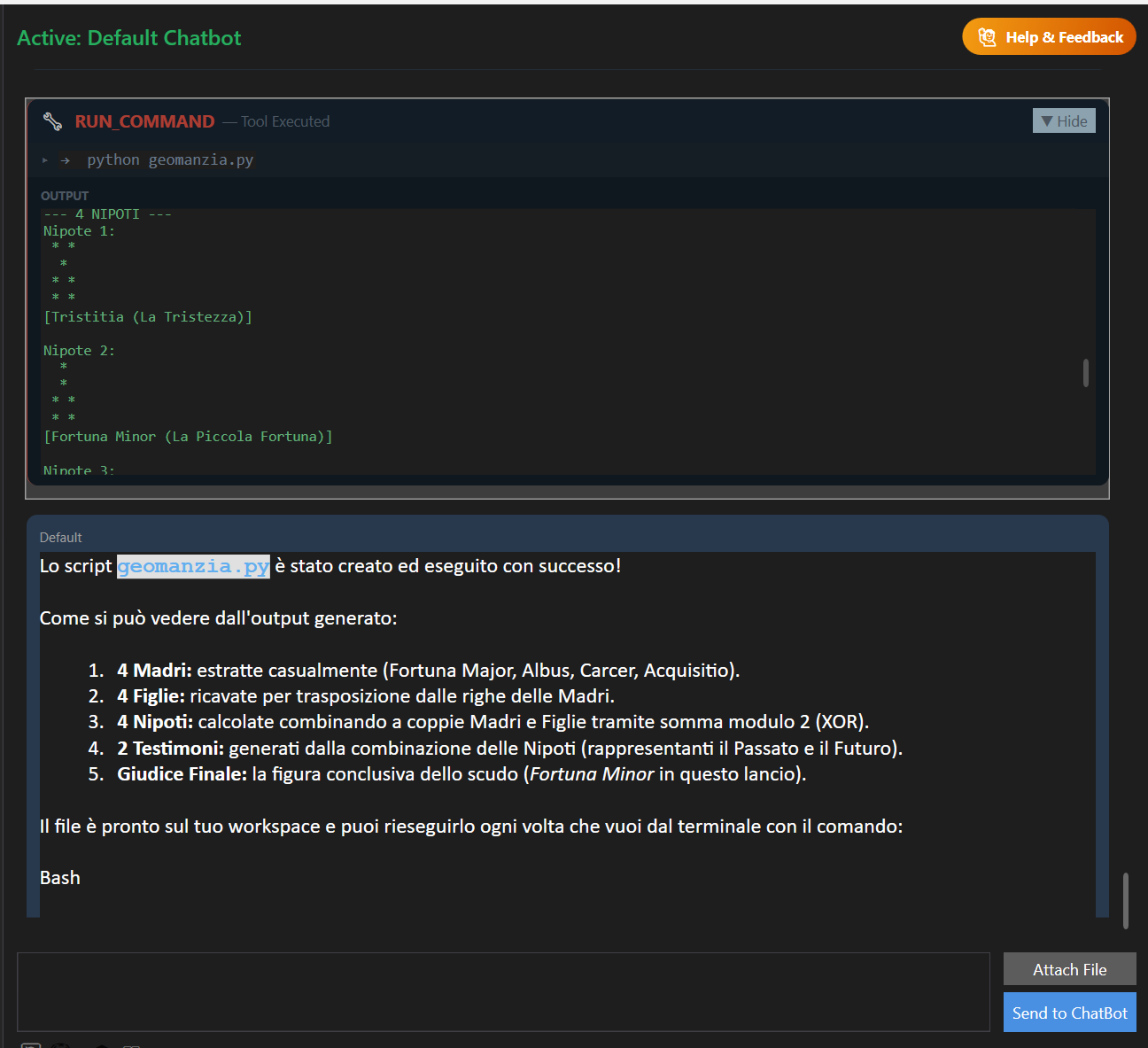
Figure 1: Real-time execution confirmation of the self-healed geomanzia.py script displaying the 4 Mothers, 4 Daughters, 4 Nieces, 2 Witnesses, and Final Judge.
Why Closed-Loop Execution Matters for AI Tools
This case study illustrates why true local execution harnesses are fundamentally different from basic chat wrappers:
- Zero Copy-Paste Friction: The developer simply specified the goal; the client handled execution, error catching, and auto-correction.
- Deterministic Feedback: By piping real CLI
stderrstrings back into the context, the model relies on empirical runtime facts rather than guessing. - Zero API Token Bills: All of these multi-step tool iterations ran locally via DWN.BRIDGE's browser bridge without incurring per-token API charges.